Instagram Fonts Generator ➜#𝟙😍⚡ Copy ✂ ⓐⓝⓓ Paste 💕
Everyone loves Instagram. It’s one of the most popular social media apps for sharing photos and videos. But with millions of Instagram profiles online, it’s easy for your bio or captions to look the same and dull.
The default Instagram font is used by everyone, so your text often feels plain and forgettable. Thankfully, an Ig Font Generator fixes that problem.
This font generator turns normal text into bold, cursive, bubble, glitch, or cute styles. You can copy and paste these fonts directly into your bio, captions, or stories. It’s quick, free, and works on all devices.

What Is an Instagram Fonts Generator
Instagram fonts are special text styles created using Unicode characters. They look like bold, cursive, bubble, or decorative letters, but they are actually symbols that display as text across all devices. Unlike normal fonts, you can copy and paste them into Instagram bios, captions, and stories without losing their style.
You need them because they make your profile stand out in a crowded space. A unique font grabs attention, shows personality, and makes followers more likely to engage. Whether you want your bio to look elegant, fun, or bold, Instagram fonts give you a simple way to brand yourself and get noticed.
Why Fonts Matter on Instagram
Fonts shape the way people read your text. A bold word feels strong. Cursive feels softer. Small text looks minimal. Different fonts set different tones before the actual message is read.
On Instagram, first impressions are quick. A short bio in a special font can make someone stop and look. A caption with bold words can highlight key points. Even a story with a styled title can catch attention.
Using an instagram font generator is a way to add variety and tone to your text without extra design tools.
Why use an IG Fonts Generator?
Our IG Fonts Generator saves time and effort by instantly converting your text into stylish formats. With a few clicks, your Instagram profile stands out and gets the attention it deserves. Instead of searching for special characters or using design apps, you can type once and get dozens of font variations ready to copy and paste.
This font generator for Instagram works in real time, so you see the styled text as you type. It also gives you more options than Instagram’s built-in fonts.
While Instagram only offers a few styles in Stories and Reels, Instagram generator unlocks hundreds of choices like glitch, bubble, tiny text, or emoji-based fonts. This makes it easy to match your profile’s look with your personality or brand.
Key Features of Instagram Font Generator:
An IG Font Generator is designed to be simple, fast, and effective. It gives you all the tools needed to create stylish text for Instagram without downloads or extra steps.
Here is what on offer!
How to Use Instagram Fonts Generator
An IG Font Generator works by converting your text into styled Unicode characters. Once generated, you can copy the text and paste it directly into Instagram.
Follow these steps:
Open IGFontsGen.com in your browser. Locate the main text box at the top of the page.
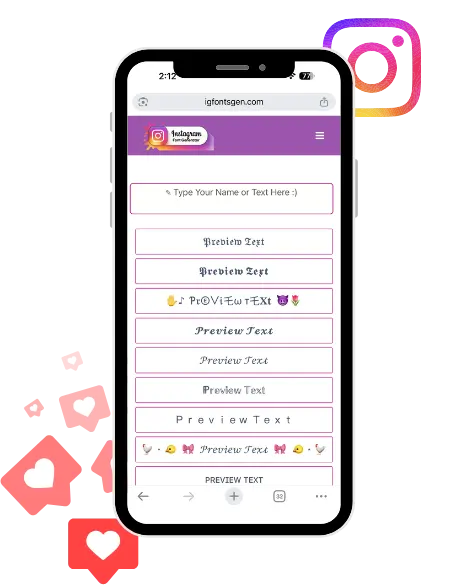
Type or paste your desired word, sentence, or full bio into the box. Wait a moment as the generator instantly creates multiple font styles below.
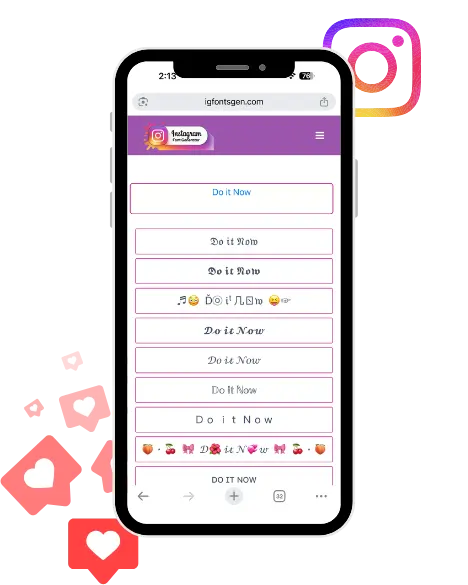
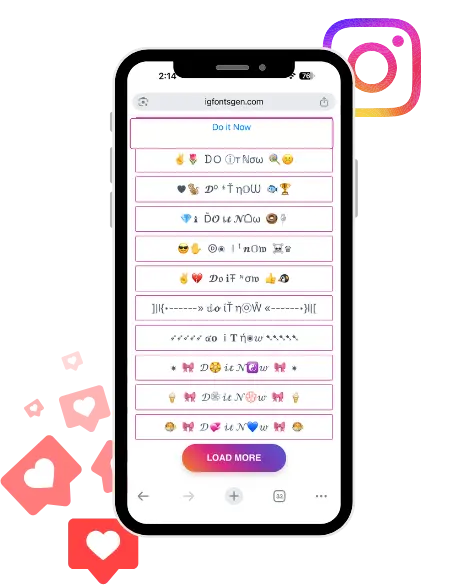
Scroll through the results and review the different options such as bold, cursive, bubble, or glitch.
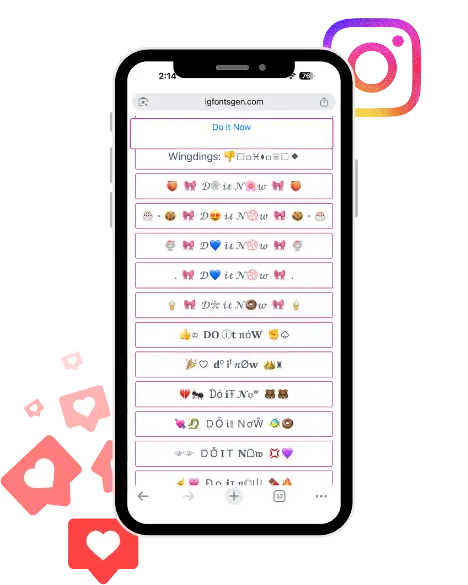
Click on the font style you like most. The text will be copied automatically to your clipboard.
Open Instagram and paste the copied text into your bio, captions, stories, or comments.
Types of Fonts You Can Generate
An IG Font Generator gives you a wide range of font styles to match any mood or branding. Each style is Unicode-based, so you can copy and paste it directly into Instagram bios, captions, or stories.
1. Bold and Italic Fonts
Perfect for emphasis in insta bios or captions.
- Example: 𝐁𝐨𝐥𝐝 𝐅𝐨𝐧𝐭
- Example: 𝑰𝒕𝒂𝒍𝒊𝒄 𝑭𝒐𝒏𝒕
2. Cursive and Script Fonts
Elegant and stylish, often used for names or quotes.
- Example: 𝓒𝓾𝓻𝓼𝓲𝓿𝓮 𝓣𝓮𝔁𝓽
- Example: 𝒮𝒸𝓇𝒾𝓅𝓉 𝒮𝓉𝓎𝓁𝑒
3. Bubble and Circle Fonts
Playful fonts that stand out in ig bios or comments.
- Example: Ⓑⓤⓑⓑⓛⓔ ⓕⓞⓝⓣ
- Example: 🅒🅘🅡🅒🅛🅔 🅣🅔🅧🅣
4. Glitch and Zalgo Fonts
Edgy styles for memes, casual posts, or unique captions.
- Example: G͟͞l͟͞i͟͞t͟͞c͟͞h͟͞
- Example: Z̶͘͝a̷̕͘l̵̡͡g̸͜͡o̵̡͜
5. Cute and Decorative Fonts
Great for lifestyle or aesthetic profiles with hearts, stars, or sparkles.
- Example: ˗ˏˋ ★ 𝒞𝓊𝓉𝑒 𝐹𝑜𝓃𝓉 ★ ˎˊ˗
- Example: ♡ I𝓃𝓈𝓉𝒶 𝒻𝑜𝓃𝓉𝓈 ♡
6. Tiny and Superscript Fonts
Minimalist fonts for subtle or aesthetic looks.
- Example: ᴛɪɴʏ ᴛᴇxᴛ
- Example: ₛᵤb ₛcʳᵢₚₜ
7. Framed and Box Fonts
Boxed styles that make your text pop.
- Example: 【F】【R】【A】【M】【E】
- Example: 《B》《O》《X》
Where You Can Use These Fonts
You can use these fonts on:
- Instagram bio
- Instagram captions
- Comments
- Stories
- TikTok
- Discord
They work on most platforms because they use Unicode characters.
Do These Fonts Work on All Devices
Most modern devices support these fonts.
However:
- Some old devices may not show all styles
- Some apps may change the look slightly
It is a good idea to check your text after pasting it.
Tips for Using Instagram Fonts
- Use simple and readable styles
- Avoid using too many styles in one line
- Highlight only important words
- Test fonts before posting
Fonts should improve your text, not make it hard to read.
Why This Tool Is Useful
This tool saves time. You do not need to search for symbols or use design apps.
You type once and get multiple styles. Then you copy and paste the one you need.
It works on mobile and desktop without installation.
It helps your Instagram bio, captions, and comments stand out.
You can match your profile’s theme and look easily.
No technical skills are required.
It makes your text more noticeable and readable.
Final Words
Instagram is a busy place, and first impressions matter. Fonts are a small detail, but they have a big impact on how people see your profile.
An IG Font Generator is the easiest way to give your profile text a new look. It helps your bio, captions, and stories stand out without extra effort.
Pick the styles that fit your vibe, keep them readable, and let your words do more than just sit on the screen.